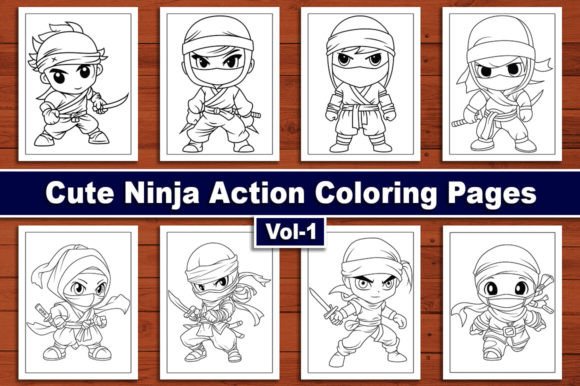
Getting the Most From Cute Ninja Coloring Pages for Kids Vol-1
There is a quiet charm to hand-drawn artwork that digital auto-tracing simply cannot replicate. Cute Ninja Coloring Pages for Kids Vol-1 delivers exactly that — ten original, hand-illustrated ninja characters ready for printing, publishing, or personal use. The set includes a full spread of file formats: JPG, PNG, PDF, AI, EPS, and SVG, all sized at 8.5 by 11 inches with a clean 300 DPI resolution. On paper, that sounds straightforward. In practice, people regularly trip over the same handful of decisions that turn a promising coloring project into wasted time or disappointing output.
What follows is a practical look at where things tend to go sideways and how to steer clear of those pitfalls, whether you are building a KDP interior, stocking a classroom activity shelf, or selling printable bundles online.
Assuming All Ninja Coloring Pages Are Interchangeable
One of the quietest mistakes people make is treating all ninja-themed coloring sheets as equal. A quick image search yields hundreds of ninja outlines, many of them jagged, overcomplicated, or clearly run through a live-trace filter. Those files print poorly. Lines break. Details blur. Kids lose interest because the artwork feels cold or chaotic.
The ten different ninja action figures in this volume were drawn by hand. That matters more than it might seem. Hand-drawn lines carry organic variation — slightly thicker edges near shadows, softer curves around cheeks and hands, small intentional imperfections that give each ninja a distinct personality. One character balances on a rooftop with a playful grin. Another crouches mid-strike, oversized hood slipping just past the eyes. These details invite a child to linger over color choices rather than rush through a uniform outline.
Before you commit to a coloring page set, zoom in. Look at the line quality. Ask whether the art feels warm and approachable or stiff and mechanical. Charm is the word to chase here, not just clip-art volume.
Ignoring File Format Needs Before You Start
A surprisingly common frustration goes like this: someone purchases a coloring page bundle, unzips the folder, and discovers every file is a flattened JPG. They need to tweak line thickness. They want to remove a background element. They planned to resize without quality loss. None of that is possible with a raster-only set.
Cute Ninja Coloring Pages for Kids Vol-1 sidesteps this entirely by packaging the artwork across six formats. The vector files — AI, EPS, and SVG — let you scale any ninja action figure to a poster, a greeting card, or a small sticker sheet without losing crispness. The PNG files preserve transparency, which is invaluable if you want to layer the ninja characters onto themed backgrounds or combine them with text. The PDF folder is ready for direct printing. The JPG folder works everywhere, no compatibility questions asked.
The mistake is not checking what you actually need before you begin. If your workflow depends on Adobe Illustrator, the AI files are your starting point. If you use open-source software like Inkscape, reach for the SVG folder. If you simply want to print and go, the PDF or JPG collection will serve you well. Knowing this ahead of time prevents the scramble of converting files after the fact — a process that often degrades quality quietly.
Overlooking the Importance of DPI for Print Quality
DPI confusion tends to surface at the worst possible moment — right before publishing. Someone sets up a KDP interior, uploads the manuscript, and receives a rejection notice citing low image resolution. Or they print twenty copies for a birthday party and every page looks slightly soft, as though viewed through a foggy window.
Every file in this set is delivered at 300 DPI, which is the publishing standard for print-on-demand platforms like Amazon KDP. That resolution holds detail at the 8.5 by 11 inch trim size without visible pixelation. If you have ever tried upscaling a 72 DPI web image to print dimensions, you know the muddy, blocky result. With 300 DPI already baked in, you avoid that headache entirely.
Still, a practical warning: when you import these files into your document layout software, double-check that the software did not downsample them automatically. Some programs default to 150 DPI for embedded images to keep file sizes manageable. Override that setting. Your final print will thank you.
The Licensing Misunderstanding That Trips Up Sellers
If you plan to use these cute ninja coloring pages in a commercial product — a printed book, a printable Etsy listing, a classroom fundraiser — clarity around usage rights matters enormously. The most preventable dispute in the coloring book niche involves someone assuming full commercial rights when the product license only covers personal use.
This particular volume is structured for KDP interiors and similar applications, which implies broader usage flexibility. But never assume. Read the license terms included with your purchase. Understand whether you need to credit the artist, whether you can modify the artwork, and whether there are any print-run limits. Taking five minutes to confirm these details protects you from platform takedowns and awkward conversations later.
Printer Calibration and Paper Choices Nobody Talks About
High-resolution files do not automatically produce beautiful prints. The chain from digital file to physical page includes your printer, your ink levels, and the paper sitting in the tray. People often blame the artwork when the real culprit is a printer spitting out faded lines on thin, absorbent paper.
Standard copy paper soaks up ink differently than cardstock. The same ninja illustration printed on 20-pound bond will look dull and possibly bleed through to the other side. A 65-pound bright white cardstock, by contrast, holds crisp edges and gives markers or colored pencils a smoother surface to work across. If your goal is a premium coloring book interior, test on the paper stock you intend to use before running a full batch. Adjust your printer settings — select high-quality or photo printing mode, turn off any automatic color correction that might shift the black line art toward blue or brown, and ensure your ink cartridges are not running low.
One overlooked detail: some laser printers render vector lines slightly thicker than inkjet printers do. If the ninja characters look heavier than expected, try printing a test page from the PNG or JPG raster files instead of the vector PDF. The difference is subtle but can matter when fine facial expressions or small ninja tools are involved.
Using Files Straight Without Considering the End User
This mistake shows up most often in KDP publishing. A creator drops the ten ninja coloring pages into a template, uploads, and publishes without thinking about bleed, margins, or whether a child can actually color the edges of the page. The result is a book where half the ninja's foot disappears into the binding gutter.
The 8.5 by 11 inch dimensions are a solid starting point, but you need to account for the binding method. For a perfect-bound KDP book, leave enough inner margin — typically 0.375 inches or more — so artwork near the spine remains accessible. If the design pushes critical elements too close to the edge, shift them inward or scale slightly to protect the user experience. A frustrated five-year-old unable to finish coloring a ninja star because it vanishes into the fold is not the reviewer you want.
Similarly, single-sided printing with a blank reverse side prevents marker bleed from ruining the next illustration. If your layout places two ninja action figures back-to-back, use heavier paper or include a note suggesting crayons or colored pencils over wet markers.
Failing to Preview Across Devices and Formats
The SVG and EPS versions of these ninja illustrations will open correctly in professional design software. But if you plan to sell the PNG or JPG versions as digital downloads, test how they display on a tablet screen. Colors shift between RGB and CMYK profiles. A file that looks crisp on your calibrated monitor may appear washed out on an iPad or overly dark on a budget Android tablet.
This is not a flaw in the source files — it is a delivery consideration. Before selling or distributing, open the files on at least two different screens. If you notice a shift, you can adjust brightness or contrast gently without compromising the hand-drawn line integrity. Keeping a reference print nearby helps you judge whether the digital preview matches the physical output.
Skipping the Obvious: Actually Printing and Coloring a Sample
It sounds too simple to mention, yet plenty of professionals skip this step. They trust the resolution specs and the screen preview, then ship a product they have never held in their own hands. Print one of the ninja action figures. Color it. Use the tools your audience will use — children's markers, twistable crayons, gel pens. Notice how the ink interacts with the paper and the printed lines. Notice how long it takes to complete. Notice whether the level of detail suits the age group you are targeting.
The ten ninja designs in this volume strike a thoughtful balance. They are detailed enough to hold attention — small belts, shuriken, facial expressions, dynamic poses — but not so intricate that younger kids feel overwhelmed. That sweet spot is easy to appreciate when you sit down and actually color a page. It is also the kind of insight that sharpens your product descriptions and marketing copy because you can speak from direct experience rather than assumptions.
Undervaluing the Versatility of the Collection
When people hear Cute Ninja Coloring Pages for Kids Vol-1, they picture a straightforward coloring book. That works, certainly. But the ten different ninja action figures extend into craft projects, party activities, classroom rewards, and quiet-time binders. The PNG files with transparent backgrounds make excellent stickers when printed on adhesive paper. The vector files can be resized for iron-on transfers, tote bags, or wall decals. A single purchase branches into multiple uses if you take a few minutes to map out the possibilities before locking into a single format.
For entrepreneurs, bundling these coloring pages with other themed activity sheets — mazes, word searches, dot-to-dot puzzles — creates a larger, higher-value digital product. For parents, printing a few ninja sheets before a long car ride costs almost nothing and buys a stretch of focused quiet. Recognizing the versatility early prevents the regret of using the files narrowly when they could have served several purposes across different projects.
Practical Takeaway for Better Results
Spend ten minutes up front. Confirm your required file formats. Verify your printer settings and paper choice. Check any licensing terms that affect your intended use. Print and color a sample page. These small steps separate projects that look professional from those that feel rushed. The artwork in this collection is already strong — hand-drawn, properly sized, and delivered in every format you are likely to need. The variable is how thoughtfully you bring it into your world, whether that is a published book, a classroom, or your own kitchen table on a rainy afternoon.