DIY Project Planner KDP Interior: The Smart Way to Publish
When you think about selling planners on Amazon KDP, you might picture generic calendars or simple to-do lists. The DIY Project Planner KDP Interior flips that script entirely. It targets a creative, motivated audience that genuinely needs structure—and it does so with a complete, print-ready package designed to save you hours of design work. Whether you’re a seasoned KDP seller testing a new niche or a beginner exploring low-content publishing for the first time, this interior offers a straightforward path from download to listing.
What makes it stand out isn’t just the page count. It’s the blend of practical organizational tools and the freedom to customize. You receive a 122-page PDF that’s been KDP tested, meaning the margin, bleed, and sizing are already dialed in. No guessing. No late-night formatting panic. You simply upload the file, set your price, and let the book do the rest—while you focus on marketing or lining up your next product idea.
What Exactly Is the DIY Project Planner KDP Interior?
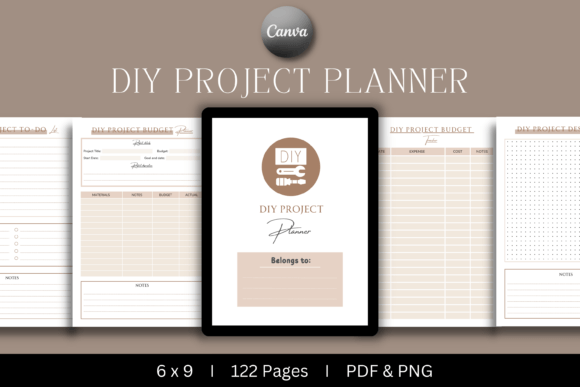
At its core, this is a low-content book interior created for DIY enthusiasts, hobbyists, and anyone who juggles multiple creative projects. Inside, you’ll find structured templates that guide a user from initial inspiration all the way to a finished project. The planner doesn’t just offer blank lined pages; it includes dedicated sections like a DIY Project Budget Tracker, a DIY Project Design Planner, and a DIY Project To-Do List. Each page serves a clear function, making it easy for buyers to pick up the book and immediately start planning.
The term “KDP interior” might sound technical, but it simply refers to the digital file you upload to Amazon’s Kindle Direct Publishing platform. This particular interior arrives as a ready-to-upload PDF, alongside a PowerPoint file and an editable Canva template link. That versatility matters because you can tweak colors, fonts, or small layout details without any advanced graphic design skills. However, note that the Canva template requires a Pro account to access all features.
Why This Planner Works for Your KDP Business
KDP sellers often struggle to find interiors that strike a balance between niche appeal and broad usability. Overly specialized planners might attract only a handful of buyers, while overly generic ones drown in a sea of competition. The DIY Project Planner KDP Interior hits a sweet spot. The do-it-yourself community is enormous, covering everything from home renovation and woodworking to upcycling, crafting, and even digital projects. People in this space actively seek tools that help them stay organized without stifling their creativity.
For your business, that translates to a product with steady demand. Someone planning a bathroom remodel can use the budget tracker to compare material costs. A weekend woodworker might rely on the design planner to sketch dimensions and record finishing steps. A quilter could fill the to-do list with fabric cutting, piecing, and binding tasks. Each person uses the same book in slightly different ways, which means your listing can naturally attract multiple buyer personas.
Beyond demand, the 122-page count offers the kind of substantial feel that shoppers often associate with value. A thin 30-page booklet rarely commands a premium price, but a well-structured, thicker planner signals that the buyer is getting a truly useful resource. The included welcome page also sets a professional tone right from the start, which can help reduce early returns or negative reviews.
Inside the 122-Page Toolkit
Let’s walk through what arrives in your download. The main file is a print-ready PDF optimized for a 6x9 inch trim size with bleed. That’s a common KDP format, and the bleed ensures that any background color or design elements extend cleanly to the edge during printing. You won’t see awkward white margins creeping in.
The structural pages include:
- Welcome Page – A simple introduction that makes the planner feel like a complete product.
- DIY Project Budget Tracker – Dedicated space for estimating costs and tracking actual spending, which is invaluable for anyone keeping an eye on project expenses.
- DIY Project Budget Planner – A slightly more granular version, useful for planning phased projects or comparing multiple contractor bids.
- DIY Project Design Planner – Room for sketching, noting dimensions, selecting colors or materials, and documenting the creative vision.
- DIY Project To-Do List – Clean checkbox-style layouts to break any undertaking into manageable action steps.
While the exact distribution of pages varies across these sections, the overall design stays visually consistent. You also get a PNG file, which is perfect for creating promotional graphics or a quick mockup to feature in your Amazon listing. And if you prefer to customize beyond what the PDF allows, the PowerPoint file and the Canva template link give you full control—though the Canva template does require a Pro subscription for all editing capabilities.
How DIY Enthusiasts Use This Planner Every Day
Imagine a first-time homeowner staring at a dated kitchen. They’ve watched dozens of tutorial videos, pinned a hundred inspiration photos, and bought a few basic tools. What they lack is a clear plan. The DIY Project Planner KDP Interior becomes their command center. They’ll open the design planner to sketch a rough layout of their cabinets and note the paint color codes they’ve chosen. Next, the budget planner helps them input estimated costs for backsplash tiles, hardware, and paint—and later, they can compare those projections to actual receipts.
The to-do list then breaks the overwhelming idea of “remodel kitchen” into bite-sized tasks: remove old cabinet doors, sand surfaces, apply primer, paint first coat, install new handles. Checking those boxes creates momentum and reduces the paralysis that often stalls ambitious projects.
On the craftier side, a maker selling handmade wooden signs at local markets might use the budget tracker to calculate material cost per unit and set appropriate pricing. The design planner doubles as a template library—sketching out different sign shapes and lettering layouts before committing to expensive wood. In both cases, the planner doesn’t just sit on a shelf; it actively moves a project forward.
Getting Started with the Editable Templates
For many KDP sellers, the real magic lies in the Canva template and PowerPoint file. Let’s say you want to add a slightly different header font or shift the color palette to a more boho aesthetic. With the Canva link (and a Pro account), you can open the entire planner, make changes across all pages using brand kits, and then download a fresh PDF. Even small tweaks like adjusting the tracking on a to-do list can heavily influence buyer perception, helping your version stand out from others using the same base interior.
The PowerPoint file takes a more direct approach. It’s especially helpful if you’re comfortable with basic slide editing but don’t use Canva. You can rearrange the order of sections, duplicate certain pages to give a budget tracker more weight, or even add a few custom pages before converting the file back to PDF. These options turn a ready-to-go interior into a flexible starting point, letting you balance speed and personalization.
Print-Ready Essentials You Can Trust
The phrase “KDP tested” appears repeatedly in the product description for a reason. Amazon’s printing process can be finicky. Margins that look fine on screen sometimes cut off text in a printed copy, and set-up errors lead to frustrated customers. This interior has already been validated for Amazon’s requirements, which means you don’t have to order a proof copy just to check if the content falls within safe zones—though you always can for peace of mind.
The 6x9 inch format with bleed is a deliberate choice. It’s a comfortable size for users to write in, and it fits well on most bookshelves. The bleed ensures that any background graphics reach the physical edge of the page, delivering that professional bookstore-quality look. Combined with the 100% original premium quality interior design, you’re presenting buyers with a tool that feels polished, not like a rushed template thrown together in an afternoon.
Important Considerations Before You Publish
Even the best interior won’t sell itself. You’ll still need an appealing cover that conveys the planner’s purpose at a glance. Soft pastels with clear typography often work well, but you could also lean into a more industrial, blueprint-inspired design for the woodworking crowd. The PNG file included in the package can serve as the base for a simple cover mockup, so you’re not starting from scratch.
Also, think about how you’ll describe the planner in your Amazon listing. Avoid simply copying the provided file list. Instead, frame the benefits: “Stay on budget with dedicated expense trackers,” or “Turn overwhelming ideas into a step-by-step to-do list.” Highlighting the design planner and budget sections specifically addresses the pain points of someone who tends to lose receipts or forgets which paint color matches which room.
Price thoughtfully. A 122-page planner with bleed and professional design can justify a slightly higher price point than a thinner competitor, but you’ll still want to check what similar books in the DIY niche are charging. Sometimes pricing slightly below the median while you gather initial reviews can help build momentum. Pay attention to your A+ Content or product description layout as well—bullet points with short, scannable lines work wonders.
Lastly, remember that this interior is sold as a digital product you resell as a physical book. The files aren’t for you to resell directly as a digital download unless your specific license allows it. Read the terms, but typically, KDP interiors like this are meant for uploading to Amazon to create paperbacks, not for redistribution of the source files.
Why Quality Interiors Make a Difference
When readers flip through a planner, they form an opinion in seconds. Crooked lines, inconsistent spacing, or a cover that promises “budget tracker” but delivers only five pages of it can lead to quick disappointment. The DIY Project Planner KDP Interior sidesteps that by covering the essentials thoroughly. Every element, from the welcome page to the project design planner, feels intentional. It’s not just a collection of random sheets—it’s a cohesive system that mirrors how real people tackle projects.
For creators nervous about technical setup, the included ready-to-upload PDF removes guesswork. For those who love tweaking layouts, the Canva and PowerPoint options provide a creative playground. And for buyers, the finished book becomes a reliable companion that keeps their craftsmanship, renovations, and hobby work organized without stifling the joy of making.
If you like having high-quality interiors at your fingertips, consider subscribing to the creator’s profile. They add new, original products every few days, so you’ll always have fresh material for your KDP store. That kind of consistency can help you build a recognizable brand across multiple planner sub-niches, all while reducing the time you spend searching for files that actually meet Amazon’s standards.