Daily Walking Tracker KDP Interior: Streamlining Health Journals and Publishing Workflows
Publishers in the low-content books niche understand that quality interiors can make or break a product launch. A Daily Walking Tracker KDP Interior is not just a collection of dated pages—it’s a ready-to-use structural asset that shortens the path from concept to published notebook. Whether you’re building a wellness journal brand or experimenting with a new health niche on Amazon KDP, having a pre-tested interior saves hours of formatting guesswork and lets you focus on design, marketing, and audience connection.
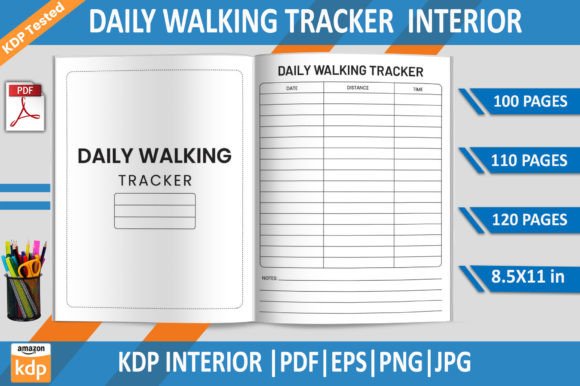
What makes this particular asset compelling is that it arrives as a coordinated file set: a print-ready PDF, editable EPS files, and high-resolution PNG and JPG versions. It’s built around the 8.5×11-inch format at 300 DPI, with no bleed issues, and it has already passed Amazon’s print checks. For someone managing multiple KDP titles or planning a series of walking trackers for different demographics, this kind of foundation eliminates repetitive technical troubleshooting and creates a consistent baseline you can reuse across projects.
The Role of Printable Interiors in the Low-Content Publishing Space
Low-content books—journals, diaries, trackers, logbooks—thrive on repeatable structures. End users value clarity and enough space to record daily activity, while publishers need interiors that print cleanly and align with Amazon’s trim size and margin requirements. When you license a Daily Walking Tracker KDP Interior Template that has been tested on KDP, you’re not just buying a design; you’re buying process efficiency. The template integrates directly into your production pipeline, reducing the trial-and-error cycle that often accompanies new book interior creation.
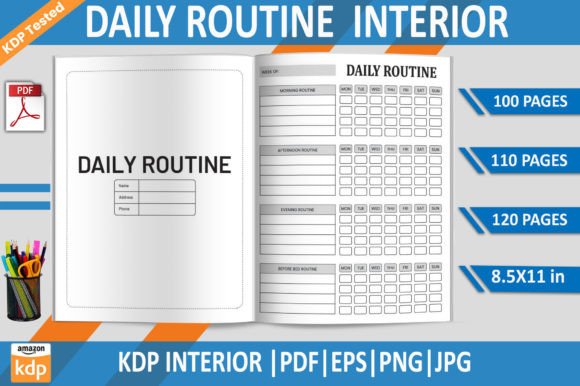
These interiors also work well in tandem with other tools. You might open the EPS file in Adobe Illustrator to adjust fonts or add branding elements, then export to PDF and combine with a cover created in Canva or Photoshop. Because the interior already respects KDP’s margin and text-safe areas, you can move between the editing environment and the KDP previewer without unexpected rework. The 100-, 110-, and 120-page variants included in the package let you quickly serve different customer preferences or price points, all from the same core asset.
Inside the Daily Walking Tracker Template: What You Get and Why It Matters
A closer look at the file list reveals why this product fits smoothly into a professional workflow. You receive multiple PDFs—each with a different page count—so you can publish a slim 100-page journal or a thicker 120-page edition without manually duplicating pages. The inclusion of an EPS file means complete editability in vector software; you can modify fonts, line weights, or header text to match a brand voice or translate content into another language. The transparent-background PNG files are useful for quick mockups, social media previews, or building product images in Canva or Photoshop without unwanted white boxes.
The JPG and PNG files, offered at 300 DPI, support high-resolution promos and A+ Content creation. And because the interior is marked as “KDP tested,” you know that the PDFs have passed Amazon’s automated file review for trim size, margins, and printability. This testing step is often where new publishers stumble—a single margin violation can cause a rejection or poor reader experience. By starting with a tested interior, you remove that friction point from your publishing process and gain confidence in the final printed product.
Preparing Your Walking Tracker for Amazon KDP: A Step-by-Step Integration
Integrating a ready-made interior into your KDP workflow is straightforward, but paying attention to a few key steps ensures a smooth upload. First, decide on your page count. For a walking tracker that covers a full year, the 120-page PDF might be most marketable. For a shorter-term challenge journal, the 100-page version works well. Once selected, open the corresponding PDF and review it against your intended trim size. Although the file is formatted for 8.5×11 inches, you can technically scale it to other large trim sizes, but you must verify margins remain compliant.
If you plan to add custom content—perhaps an introductory page with health tips or a goal-setting section at the front—open the EPS file in Adobe Illustrator. Insert your pages, keeping the same margin boundaries, and re-export as a print-optimized PDF using the recommended settings: no bleed, high-quality compression, and fonts embedded. Then upload the PDF to KDP, preview it with the online viewer, and check for any accidental content near the gutter or trim edge. Because the base file already passed testing, you’ll likely see a clean preview on the first attempt, saving back-and-forth corrections that can delay a launch.
For publishers who create multiple interior types—walking trackers, sleep logs, meal planners—maintaining a folder structure with these ready-to-use assets becomes a valuable time-management habit. You can batch-upload variations, test different page counts in separate KDP titles, and analyze which format resonates best with your audience without starting from a blank canvas each time.
Creating a Consistent Brand with Custom Walking Journals
Low-content books often succeed when they become part of a recognizable series. A customer who loves your minimalist walking log may return for a matching weight loss tracker or wellness journal. With an editable EPS file, you can establish a visual signature: a consistent header font, a subtle logo placement, or a color scheme that carries across your catalog. The transparent PNG backgrounds help you overlay the interior design onto cover mockups, making it easier to design cohesive product listings that look professional and intentional.
This consistency also influences Amazon’s algorithm in subtle ways. When multiple products share a recognizable brand aesthetic (without crossing into intellectual property issues), repeat customers are more likely to click through from their purchase history or from related recommendation carousels. Using the same high-quality 300-DPI base for every tracker in your store builds a reputation for reliability—something that buyers of printed notebooks can feel in the crispness of lines and the absence of printing artifacts.
Positioning Your Walking Tracker for Search and Sales
Understanding how a walking tracker fits into a buyer’s life helps you write more effective product descriptions and target the right keywords. People use these trackers for daily step logging, distance goals, time walked, calories burned, and even notes on route or mood. When creating your Amazon listing, incorporate long-tail phrases that reflect real usage: “daily walking journal for women,” “step tracker logbook for seniors,” or “10,000 steps a day challenge notebook.” The flexible page count allows you to tailor the interior to specific challenges: a 30-day, 60-day, or 90-day milestone journal simply by adjusting the description, even if the interior contains 100 pages of undated entries.
From a process perspective, your listing creation becomes more strategic because you know exactly what’s inside the book. You can highlight “ample space to record date, steps, distance, duration, and notes” because you’ve seen the layout. You can mention “no bleed pages that prevent ink from showing through” because you’ve tested the file. These specific details help your listing stand out in a crowded market and align with Google’s emphasis on original, useful content—even though the buying decision happens on Amazon, the product page content influences off-site search visibility.
Practical Tips for Quality Control and KDP Compliance
While the interior has been tested, final quality control remains your responsibility. Before publishing, download a physical proof copy through KDP’s order system. Check that the lines print clearly, that no content drifts too close to the paper edge, and that the overall feel matches customer expectations for a walking log. If you edited the EPS file, double-check that all new text remains within the safe zone, particularly on left-hand facing pages where the binding might obscure content near the gutter.
Also verify that your cover file aligns with the exact page count you selected. A 120-page softcover has a different spine width than a 100-page book, and Amazon’s cover creator tool relies on accurate page counts. Because the interior package provides multiple PDFs, you can easily swap files if you decide to change the page count mid-project, but remember to update the cover dimensions accordingly. This flexibility is a major advantage of having page count variants at your fingertips.
Daily Walking Tracker as a Personal Productivity Tool
Beyond publishing, using a walking tracker yourself can transform how you and your potential customers approach health goals. The simple act of recording daily walks creates a feedback loop that encourages consistency. When you design or sell a Daily Walking Tracker KDP Interior product, understanding that psychological hook helps you craft covers, titles, and descriptions that speak directly to motivation, accountability, and progress. You can design the interior with enough structure to guide logging but enough freedom for the user to adapt it—undated pages, for example, avoid the pressure of a pre-printed calendar and allow the tracker to start on any day of the year.
For creators who use their own products before publishing them, a walking tracker can become part of a productive morning routine. After a walk, spending two minutes filling in the log reinforces the habit. Later, when writing product updates or marketing emails for your KDP store, you can draw on authentic experience: “I designed this page to have a right-hand-only layout so it’s easy to flip through and see your weekly progress at a glance.” That first-hand knowledge distinguishes your listing from generic templates and aligns with experience-based authority signals.
Expanding Your Low-Content Catalog with Minimal Friction
One of the most practical outcomes of working with a tested interior like this is the ease of creating spin-off products. Once you have a walking tracker live, you might turn the EPS file into a running log by changing headers, or a cycling tracker by adjusting terminology. The underlying grid, high-resolution lines, and KDP-safe formatting carry over, so you only need to make surface-level edits. Publishing cadence increases, and your back catalog grows with less design effort per title.
You can also pair the walking tracker with complementary interiors in a bundle: a meal planner and a walking journal sold together as a wellness kit. Because the PNG files have transparent backgrounds, creating product showcase images for such bundles is simple. Layer the interiors side by side, add a mockup of a spiral-bound notebook, and you have list-worthy content for any marketplace that values visual consistency.
Why a Tested Template Shapes Long-Term Publishing Habits
New publishers often underestimate how much time goes into debugging print files. A standard 8.5×11-inch interior might look perfect on screen, only to have Amazon reject it for margin violations or for containing text outside the printable area. By starting with an asset that has already navigated that approval process, you internalize what works. Over time, you start recognizing the telltale signs of a compliant file: the correct use of a no-bleed setup, consistent margins across all pages, and no stray elements near the edge. This knowledge transfers to your next interior project, even if you eventually create your own designs from scratch. The tested template becomes both a shortcut and a learning tool.
The provided file structure—PDF, EPS, PNG, JPG—also encourages good file management. Keep a master folder with all versions, label it clearly, and build your product presentations from the PNGs while linking the EPS for edits. When Amazon’s print-on-demand system changes specifications (as occasionally happens), you’ll quickly locate the editable file to make adjustments without starting over. This organizational habit pays dividends across a growing KDP catalog.
Making the Daily Walking Tracker Part of Your Publishing Routine
A successful KDP business often relies on systems, not one-off efforts. Integrating ready-made interiors means you can develop a repeatable launch sequence: choose a niche topic, select a pre-tested interior, customize lightly, pair with a relevant cover, upload, and order a proof. The walking tracker niche itself enjoys steady demand, as health and fitness logging remains popular with audiences ranging from senior citizens to coaching professionals. Having a reliable interior that doesn’t introduce technical delays keeps your publishing momentum steady and lets you allocate mental energy to market research and listing optimization.
Ultimately, a Daily Walking Tracker KDP Interior like this one serves as a bridge between creative vision and printed reality. It respects the technical requirements of Amazon’s platform, offers the flexibility of Adobe Illustrator support, and arrives in a tested state that reduces the risk of publication hiccups. Whether you’re launching your tenth wellness journal or your very first low-content book, this type of asset moves you from idea to income with fewer obstacles and a clearer process.