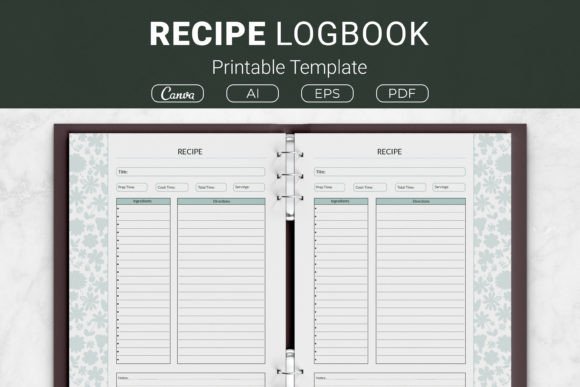
Recipe Logbook Printable Template: A Practical Tool for Every Home Cook and Creator
Keeping track of family favorites, experimental dishes, and treasured handwritten recipes often turns into a messy pile of note cards, screenshots, and stained loose-leaf pages. A Recipe Logbook Printable Template solves that problem by giving you one consistent, clean layout to document everything that matters in a recipe. It includes dedicated sections for title, prep time, cook time, servings, ingredients, directions, and notes, so nothing gets forgotten. Whether you’re a home cook building a personalized binder, a food blogger streamlining content creation, or a KDP entrepreneur looking for a ready-made interior, this template fits into a surprising number of workflows. The package usually provides multiple file formats like AI, EPS, PDF, and a Canva template link, in sizes from US Letter and A4 to the more compact 7.5x9.25 and 6x9 inches. That flexibility alone makes it more useful than most people initially assume.
Why a Structured Recipe Log Makes a Difference
You might wonder why a printable template is better than an app or a simple paper notebook. The answer lies in long-term usability. Digital recipe managers can disappear or change their terms, and plain notebooks don’t have the prompts that help you replicate a dish exactly. A well-designed Recipe Logbook Printable Template forces you to record details like prep time separately from cook time, which matters for planning a meal. It also reminds you to note the number of servings, so you don’t accidentally cook for two when you needed to feed six. Over time, that discipline turns a collection of recipes into a reliable personal resource you can share, gift, or even publish.
Many home cooks overlook the note section, treating it as optional. In practice, that small field is where you preserve the adjustments that made a recipe sing: “used less sugar, baked at 325°F instead of 350°F, not enough lemon.” Without it, you might repeat the same trial and error every holiday season. A printable template with a dedicated notes area encourages you to document those tweaks in real time.
Mistakes People Make Before Choosing a Recipe Log Template
Even a simple purchase like a printable template comes with pitfalls. The most common mistake is downloading a template that looks pretty but lacks the fields you actually need. Maybe it cuts out the cook time box to make the design more minimalist, or it combines ingredients and directions into one cramped space. That forces you to either write illegibly or skip crucial information. Before you hit download, open a preview and imagine filling it out with a messy, real-world recipe. Does the ingredients section give you enough lines? Is there room to write clear step-by-step directions? If you can’t see a preview, check the seller’s description carefully for a listing of all included sections.
Another frequent misstep is ignoring the file formats. The package for a well-made Recipe Logbook Printable Template often includes AI, EPS, PDF, and a Canva link. If you only open the PDF and never explore the editable options, you’re leaving customization on the table. For instance, a food blogger can use the AI or Canva version to add a logo, adjust the color scheme to match their brand, or add a dedicated field for a website URL. Not doing that means your recipe cards look generic when you share them online or at a community event. The template isn’t just a static printout; it’s a starting point that can adapt if you use the right file.
Overlooking Print Size and Binding Requirements
Print size can make or break your organizing system. Many people default to US Letter because that’s what their home printer handles, but they don’t consider how they plan to store the pages. If you intend to use a half-size binder or a disc-bound planner, a full 8.5x11 sheet quickly becomes awkward. The inclusion of 7.5x9.25 and 6x9 options isn’t random; those sizes are popular for KDP interiors, portable kitchen notebooks, and giftable recipe collections. Imagine printing a 6x9 logbook, punching holes, and tucking it into a small ring binder that sits on your counter without hogging space. Choosing the wrong size upfront can lead to wasted paper, misfit binder covers, or print margins that cut off your ingredients list.
Also, pay attention to how the template handles margins and bleed if you’re using it for Kindle Direct Publishing. A Recipe Logbook Printable Template that’s marked as KDP-friendly should already have appropriate trim sizes and no critical content too close to the edge. But if you resize it yourself without understanding bleed, you might end up with a published book where the top line of ingredients gets clipped. Always do a test print on your home printer first, even if you’re aiming for professional printing later. That step reveals margin issues and alignment problems before they become expensive mistakes.
Using the Template for More Than Just Personal Storage
It’s tempting to think of a recipe log as strictly for private use, but the versatility of this product opens other doors. Food bloggers can use the template as a consistent starting point for every recipe they develop, ensuring that each post’s printable card echoes the same structure. That small detail improves the reader experience because returning visitors know exactly where to find prep time or serving count. Content creators who sell meal plans or cooking guides can use the template as a branded handout. Instead of designing something from scratch, they load the Canva template, apply their fonts and colors, and export a polished PDF in under ten minutes.
For KDP authors, a Recipe Logbook Printable Template with commercial rights becomes a product you can sell. The 6x9 inch format fits Amazon’s print-on-demand specifications perfectly. You can add a cover, a table of contents, and supplementary pages like a measurement conversion chart or a pantry inventory list, then publish a no-content or low-content book that fills a real need. However, a common error here is assuming that any template can be resold. Always verify the license. If the package states it’s open source or includes commercial use rights, you’re in the clear. Otherwise, using it in a product you sell could lead to copyright issues.
How to Avoid the “Fill Once and Forget” Trap
Even the best template becomes useless if it stays empty. Some people print ten pages, fill one out beautifully, and then let the rest gather dust because the system doesn’t feel effortless. The fix is to integrate the log into your existing kitchen routine. Keep a clipboard with a few blank sheets in a designated drawer next to the spices. When you try a new recipe, jot down the details right after you taste it, while your memory of what you changed is fresh. Don’t wait until the end of the week; by then, you’ll forget whether you used smoked or sweet paprika. The template’s structure works in your favor here because it’s faster to fill in prompted blanks than to craft a sentence from scratch.
Another anti-avoidance tip: start with your most-loved recipes first. Spend an hour on Sunday transferring five or six family staples into the logbook. You’ll immediately see the value when you have a clean, unified set of instructions to hand to a friend who asks for your famous chili recipe. That tangible payoff encourages you to keep going. If you skip that initial bulk transfer and only use the template for new recipes, your collection remains fragmented between old handwritten notes and the new system, which feels chaotic.
What to Examine in the Template Before You Commit
Whether you download a free version or buy a premium package, look beyond the cover design. Check the ingredients section carefully. Does it use bullet points or numbered lines? Numbered lines are better for tracking quantities at a glance, while bullet points give you freeform flexibility. Both work, but you should choose what matches how your mind processes a recipe. Also, confirm that the directions area has enough vertical space. A recipe for a multi-step layer cake needs more room than a simple salad dressing. If the template barely fits three short lines, it won’t serve you for complex dishes.
Consider the note area’s placement. Ideally, it sits close to the directions, not tucked away in a corner you’ll overlook. Some Recipe Logbook Printable Template designs put notes at the very bottom or side, which works fine as long as there’s enough space to write things like “substitute almond milk,” “next time use less salt,” or “perfect for summer cookouts.” This seemingly minor detail determines whether you’ll actually use the notes or ignore them.
Finally, test the template in a digital format if you plan to use it on a tablet with a stylus. Open the PDF in GoodNotes, Notability, or a similar app, and write a sample recipe. The sections should be large enough that your handwriting doesn’t feel cramped. If the template was designed primarily for print, the digital writing experience might still be acceptable, but if it’s too small, you’ll need to look for a version optimized for tablet note-taking. The Canva template link can also be a lifesaver here because you can duplicate the page, resize elements slightly, and export a digital-friendly version.
Making the Most of Multiple Sizes and Formats
The inclusion of so many sizes isn’t meant to confuse you; it’s meant to cover different real-world uses. US Letter and A4 are natural for three-ring binders and kitchen command centers. The 7.5x9.25 inch size offers a nice middle ground, providing more writing space than 6x9 but still being easier to store than a full sheet. The 6x9 inch option is the go-to for KDP and for a compact recipe journal you can slip into a purse or a cookbook shelf. If you’re new to printable templates, start with the size that matches your existing storage. If you don’t have a plan yet, select A4 or US Letter and print two pages per sheet when you need a smaller version; that trick cuts down on paper without requiring a separate file.
Don’t ignore the AI and EPS files. They’re not just for graphic designers. Even a beginner can open them in free vector software like Inkscape, tweak a font, or remove a line you don’t need. For example, if you never use “cook time” because you only bake and the time is always the same, you could replace that field with “oven temperature” for quicker reference. Small customizations turn a generic template into a tailor-made tool. The mistake people often make is thinking they must use the template exactly as is, but the editable formats exist precisely so you can adjust without breaking the layout.
Real-Life Scenarios Where Thoughtful Use Pays Off
Imagine a parent who wants to compile a family cookbook for a wedding gift. They collect recipes from aunts, grandparents, and siblings, all written on different scraps of paper. By copying those recipes into a Recipe Logbook Printable Template, they create a unified look. Then, using the Canva link, they add a title page, a family photo, and a brief story for each recipe. The final product, printed and bound in a 6x9 book, looks professional and heartfelt. Without the template, they might have spent hours formatting each page in a word processor, resulting in inconsistent spacing and frustrated formatting battles.
Or take a small bakery owner who wants to train new staff. Instead of handing them a dog-eared notebook, they print a stack of recipe log sheets for each product. They fill in the exact weights, mixing steps, and bake temperatures, leaving space for trainee notes. The standardized format reduces miscommunication because everyone learns to read the same layout. If the bakery eventually publishes a cookbook, those sheets become the raw material.
With a KDP creator, the path is direct: they take the 6x9 template, design a cover that matches, and upload a “Blank Recipe Journal” to Amazon. But they go one step further: they include a brief guide on how to use each section, making the book feel more valuable than a bare-bones journal. That small addition, printed on the first interior pages, improves reviews and reduces returns.
Key Checks for a Smoother Experience
Before you print or publish, triple-check the following: Is the file resolution at least 300 DPI? Low-resolution PDFs print fuzzy, especially on the lines between sections. Does the paper you plan to use handle ink well? Cheap 20-lb paper might bleed if you use a fountain pen or heavy marker, so test with one sheet. If you’re putting the pages in a binder, leave extra margin on the binding side to prevent three-hole punches from obliterating the first letter of each ingredient. Most templates account for this, but if you resize, margins can shift. Finally, if you’ll use the logbook in a humid kitchen, consider laminating a cover page or using plastic sheet protectors. Moisture and food splatters are the quiet enemies of any paper system.
These details sound granular, but they separate a recipe collection that lasts a decade from one that falls apart by spring. A Recipe Logbook Printable Template gives you the framework; your attention to usage details makes the system durable and genuinely helpful.
Ultimately, the template is a humble but powerful tool for anyone who cooks seriously enough to care about consistency and sharing. It turns chaotic jottings into a searchable, giftable, and replicable archive. The value isn’t just in the paper—it’s in the clearer thinking and fewer ruined dinners that come from having all the right information in one expected place every single time.