Streamlining Your KDP Business with a Ready-Made Sailing Logbook Interior
The decision to publish on Amazon KDP often starts with a spark—a niche, a passion, or a gap in the market. For many creators, the nautical and sailing community presents exactly that kind of opportunity. However, transforming a simple idea into a polished, print-ready book interior can be the bottleneck that delays a launch by weeks. This is where a professionally designed Sailing Logbook KDP Interior changes the entire workflow. Instead of building pages from scratch, wrestling with margin settings in Word, or learning complex design software, you get a complete, tested package that moves you straight from acquisition to upload.
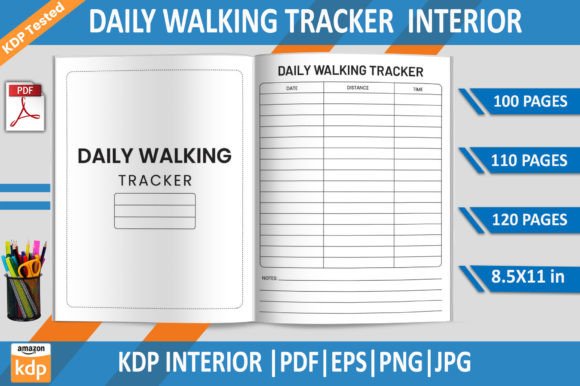
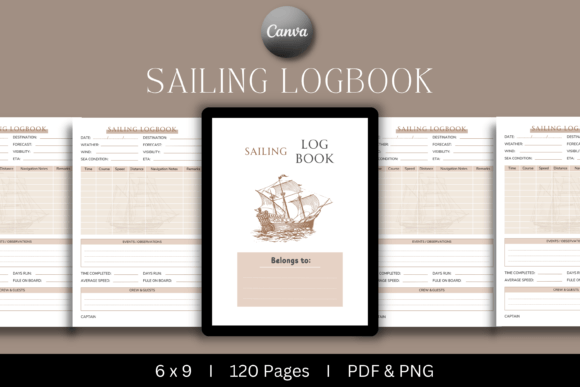
What exactly does this product contain? At its core, it’s a set of files centered around a 120-page logbook, formatted at 6×9 inches with full bleed. The package includes a ready-to-upload PDF, a PNG file for quick previews, an editable Canva template, and a PowerPoint file. That combination is deliberate. It acknowledges that not every publisher works the same way. Some will simply launch the vanilla version under their own brand; others will want to add custom touches like a unique cover, a series name, or a personalized welcome page. The inclusion of print-ready PDF files and the KDP-tested guarantee means you’re not starting from an untested blueprint—you’re starting from a reliable asset.
Where the Sailing Logbook KDP Interior Fits in Your Publishing Process
If you map out a typical KDP publishing timeline, it often looks like this: research, content creation or procurement, formatting, cover design, upload, and marketing. The Sailing Logbook KDP Interior compresses the middle three stages into a single, smooth action. The moment you download the files, you hold a complete interior that has already passed Amazon’s rigorous print checks. There’s no manual margin tweaking, no trial-and-error with bleed settings, and no frantic last-minute adjustments because the PDF didn’t meet the required specs. This allows you to shift your focus toward what actually drives sales: understanding the audience and optimizing your listing.
For someone running multiple KDP projects simultaneously, this kind of template becomes a strategic asset. You can test a niche—like sailing logbooks—without committing days to formatting. If the product performs well, you can expand the line by adding a captain’s journal, a fishing log, or a maintenance tracker, all using the same foundational design structure. The editable Canva link, which requires a Pro account, is crucial here. It lets you maintain visual consistency across a brand portfolio while swapping out specific page elements. This modular approach turns one product purchase into a scalable publishing system.
Practical Implementation: From Download to Live Listing
Let’s walk through how the Sailing Logbook KDP Interior interacts with your actual daily workflow, especially if you’re juggling other tasks. The first step is understanding what you already have. The welcome page sets the tone; the main log pages—120 of them—are structured to capture essential data such as date, vessel name, wind speed, course, and notes. If you’re a sailor or a boating enthusiast, you’ll immediately recognize that the layout serves a real need. But even if you’ve never stepped on a boat, the interior is designed to be self-contained and practical, which means you can confidently market it to the right audience without being an expert yourself.
Customizing Without Breaking the Layout
The editable templates are where the product becomes highly adaptable. Using the Canva template, you can modify fonts, adjust colors, or insert a logo on the welcome page in minutes. The PowerPoint file offers an alternative for those more comfortable with offline editing. In both cases, the core structure—margins, page numbers, bleed zones—remains intact as long as you don’t move the foundational elements. A practical tip: always duplicate the original template before making changes. This simple habit saves time if you need to revert or create a new variation later. After customization, you export a fresh PDF and upload it to KDP, confident that the interior will pass the automated review.
Integrating with Cover Design and Branding
The interior doesn’t operate in isolation. Its true power emerges when paired with a strong cover. Since the logbook uses a standard 6×9 trim, you can use KDP’s cover calculator or a third-party tool to generate a wraparound cover template that matches exactly. If you plan to create a series, consider designing a cohesive cover theme—perhaps using nautical colors, classic typography, or minimalist compass illustrations. The welcome page inside the logbook can echo these visual cues, creating a seamless brand experience from the moment a buyer flips open the book. This kind of attention to detail increases perceived value and can lead to better reviews and repeat customers.
Workflow Observations for KDP Sellers
When you introduce a pre-made interior into your publishing routine, you quickly notice a shift in how you allocate your time. Tasks that used to be technical and frustrating become swift and mechanical. Uploading a Sailing Logbook KDP Interior PDF to Amazon becomes a five-minute step rather than a session of troubleshooting. That freed-up time can go into category research, keyword analysis, or A+ content creation—activities that directly impact discoverability and conversion.
Another observation: quality control becomes simpler. Because the provider has tested the file on KDP, you avoid common pitfalls like mirrored margins not aligning correctly, images shifting during print, or fonts failing to embed. This reliability is especially valuable if you’re outsourcing other parts of the process, such as hiring a cover designer or working with a virtual assistant to handle uploads. You can send them the ready PDF and trust that the technical foundation is solid. This reduces back-and-forth and minimizes the risk of publishing a product that results in poor customer feedback.
Long-Term Use and Building a Catalog
One purchase of the Sailing Logbook KDP Interior can serve you for years if you think strategically. Beyond the immediate sailing niche, the layout and structure can inspire adjacent products. With light modifications in Canva or PowerPoint, you can transform the logbook into a general boating journal, a marine wildlife observation diary, or even a simple captain’s trip planner. The 120-page count and the 6×9 size are widely accepted across paperback journals, so you’re not locked into an ultra-narrow category.
This adaptability extends to different sales channels as well. While the primary platform is Amazon KDP, the print-ready PDF can also be uploaded to other print-on-demand services after checking their specific requirements. The editable files mean you can tweak the interior to match varying bleed or trim guidelines without starting over. This flexibility ensures that your initial investment keeps working as your business grows and diversifies.
Avoiding Common Implementation Mistakes
Even with a tested interior, users sometimes encounter friction if they skip key steps. One frequent error is ignoring the bleed. This product includes bleed, which means you must select the bleed option during the KDP upload process and use a cover template that accounts for it. Failing to do so can result in white slivers on the page edges. Another mistake is not converting Canva exports correctly. When downloading from Canva Pro, choose the “PDF Print” option with crop marks and bleed to maintain the original specs. Following these small steps ensures the final printed book looks exactly as intended.
Also, pay attention to the welcome page. It’s not just a decorative element; it’s a place to establish copyright, add a small thank-you note, or include a call-to-action for other products in your catalog. When using the editable template, you can adapt this page to suit your brand voice while keeping the log pages uniform. This balance of consistency and personalization is what separates a generic product from a memorable customer experience.
How This Interior Interacts with Other KDP Best Practices
Using a pre-made interior does not mean you can neglect the fundamentals of KDP success. The description you write, the categories you choose, and the keywords you target will largely determine whether the book gets seen. Since the interior is tightly focused on sailing, you can build your metadata around specific search terms like “sailor’s logbook,” “nautical journal,” “boat trip record book,” and “marine cruiser log.” The interior’s professional layout supports the credibility of these claims. When a customer clicks “Look Inside,” the neat, structured pages immediately signal quality, reducing hesitation and potentially boosting conversion rates.
Reviews also play a huge role. A well-formatted interior reduces the likelihood of negative feedback about printing errors or poor layout. This means you can focus your energy on delivering value through the book’s utility rather than fixing technical complaints. Over time, as reviews accumulate, the product becomes a reliable asset in your portfolio that may even generate steady passive income with minimal updates.
Ultimately, the Sailing Logbook KDP Interior functions as more than just a file pack. It’s a process shortcut, a quality assurance checkpoint, and a creative springboard all rolled into one. By embedding it into your publishing workflow—understanding its components, customizing it thoughtfully, and aligning it with solid marketing practices—you turn a single, ready-to-upload asset into a sustainable part of your KDP business. Whether you are launching your first logbook or adding to an established brand, the combination of meticulous design and practical flexibility makes this interior a smart, efficient choice for any publisher targeting the boating and sailing community.