Soul Stuff Journal KDP Interior: Your Next Publishing Win
There’s a quiet revolution happening in self-publishing, and it starts with interiors that feel both effortless and deeply intentional. The Soul Stuff Journal KDP Interior is exactly that—a meticulously crafted foundation for a journal that invites readers to pause, reflect, and put their own stories on paper. For Kindle Direct Publishing sellers, this ready-to-upload asset transforms the complex back-and-forth of layout design into a single, confident step toward a professional product that resonates with buyers looking for meaning, not just pages.
What’s Inside the Soul Stuff Journal KDP Interior
Before you even open a template, you know that print quality can make or break a journal. This product delivers a completely print-ready PDF tested for Amazon KDP, meaning margins, bleeds, and trim sizes are already aligned with platform requirements. The included 6x9 inch format is a sweet spot for journals—it feels substantial in hand without being bulky, fitting on nightstands and in laptop bags alike.
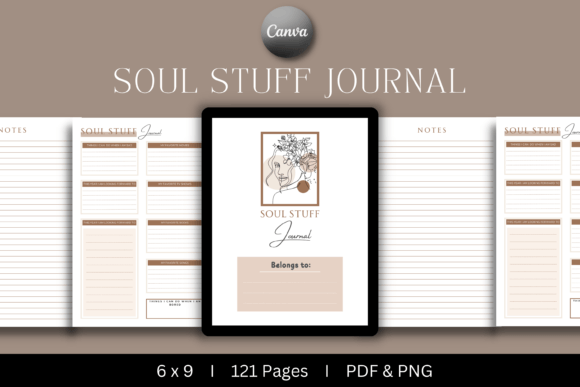
The package doesn’t stop at the final PDF. You get a welcome page that sets a gentle tone, a beautifully structured main page that repeats for 121 entries, and thoughtfully placed notes pages that extend the journal’s usefulness. Every element is intentionally spaced, leaving room for handwriting while preventing the cluttered feel that turns buyers away. The interior also includes a high-resolution PNG file of key pages, an editable Canva template link (a Pro account is needed for full flexibility), and a PowerPoint file for those who prefer an offline, familiar editing environment. The 6x9 bleed version ensures that artwork or subtle background colors reach the page edge cleanly—no white strips after trimming.
Why Small Publishers Choose This Design
Publishers, coaches, therapists, and side-hustle creators gravitate toward this interior not because it’s trendy, but because it solves a silent headache: the gap between a raw idea and a formatted, uploadable manuscript. The Soul Stuff Journal KDP Interior removes the fear of technical rejections—margins, spine issues, and image resolution are already handled. That alone saves hours of trial and error, especially for beginners who might otherwise abandon a solid concept after wrestling with software.
Beyond the technical, there’s an emotional pull. The design uses balanced whitespace, an understated yet warm type hierarchy, and a flow that moves naturally from reflection to action. It doesn’t dictate a single use. A life coach can see morning pages, a creative writer sees a daily prompt journal, and a busy parent sees a tool for capturing fleeting thoughts amid chaos. That versatility keeps the interior relevant across multiple micro-niches, increasing the likelihood of connecting with a specific audience.
Reliability is another quiet selling point. Because the files are KDP-tested, you skip the panic of print copies arriving with shifted lines or cut-off footers. The consistency in formatting also makes it easy to create a matching series later—perhaps a companion gratitude log or a quarterly planner—without redesigning from scratch.
Creative Ways to Use This Journal in Your Niche
A blank page intimidates. A gently guided page invites. The layout of this interior works because it frames personal expression without boxing it in. Here are four distinct ways to position the same core design for entirely different readers.
Mindfulness and Self-Care Communities
Reframe the journal as a “Daily Unwind Log.” Use the main page for a simple three-line gratitude prompt, a mood tracker, and an open writing block. The notes pages become dedicated spaces for breathing exercise reminders or small sketches. In Canva, you can replace the page header with phrases like “Today I release…” while keeping the underlying line spacing intact. This adaptation connects powerfully with readers who visit Amazon searching for anxiety relief tools, evening rituals, or wellness journals.
Creative Writing and Art Prompts
For an audience that craves low-pressure creative exploration, brand the interior as a “Story Sparks Journal.” Leave most of the layout untouched but add a subtle dotted pattern behind the writing area for illustrators. The PNG file can be dropped into the Canva template to create alternate versions with weekly inspiration quotes at the top. Because the PowerPoint file also supports editing, you can quickly batch-insert writing prompts like “A secret only your shoes know” across every tenth page—perfect for a 121-day challenge.
Entrepreneur Mindset and Goal Clarity
Small business owners and freelancers often search for structure, not fluff. Turn the same interior into a “Founder’s Focus Journal.” The main page can be framed as a morning priorities check-in, followed by an evening reflection block. The welcome page becomes a mission statement space. Swap the notes section into a monthly review summary by editing a few master slides. The professional yet warm design keeps it from feeling corporate, aligning perfectly with solopreneurs who want to humanize their productivity.
Parent-Child Connection and Family Memories
The journal’s gentle aesthetic also suits a shared ritual. One parent creates a “Me and Mom: Our Story Back-and-Forth” journal where each day a child writes a sentence and the parent responds. The notes pages can hold hand-drawn doodles or simple sticker charts. Because the 6x9 size is portable, it fits a child’s backpack without fuss. This adaptation taps into the gift market, where buyers look for something personal and non-digital.
Personalizing the Interior Without Design Experience
You don’t need to be a graphic designer to make this interior your own. The editable Canva template is the gateway for most creators. With a Pro account, you unlock access to premium fonts and background elements, but even free features can go a long way. Start by adjusting the color of subtle line dividers to match your cover art—maybe a soft lavender for a sleep journal or a warm ochre for a creativity log. Swap the fonts to a complementary pair that still prioritize readability; avoid elaborate scripts for main entry lines.
Small touches signal quality. Add a couple of signature quotes on the welcome page. If you’re building a brand, insert a discreet logo at the bottom of each spread—just ensure it doesn’t crowd the writing area. The PowerPoint file is a sturdy alternative for those who prefer desktop editing. Simply open the master slide, adjust text boxes, and export as PDF. Keep an eye on the bleed guides: always check that backgrounds extend to the edge of the 6x9 canvas with the bleed included, not just the trim size. A quick proof in KDP’s Print Previewer confirms everything sits correctly before hitting publish.
Originality also lies in the subtle decisions. Will you number the pages manually or leave them unnumbered for a freer feel? Will the notes pages have a faint dot grid or stay blank? These minor pivots keep the journal from feeling mass-produced, even though you started with a premium template.
From File to Amazon Best Seller: A Practical Checklist
A beautiful interior only shines when the uploading process is smooth. Here’s a grounded workflow that takes your customized file to a live listing without last-minute stress.
- Download and organize all files. Keep the original folder untouched so you always have a clean backup.
- Customize in Canva or PowerPoint. Make your branding changes, check every page for consistency, and verify that no text or important elements fall too close to the trim line (keep safe zone margins at least 0.375 inches from the edge).
- Export the final PDF. Use the “PDF Print” setting and ensure bleed is included if your background uses edge-to-edge color. Select “flatten PDF” to lock in fonts.
- Create your KDP title. Enter the book details, choose “paperback,” and select cream or white paper based on your design (the interior works well with both; test a printed proof if unsure).
- Upload the manuscript and cover. The interior upload is straightforward because the PDF is already sized and tested. Use the previewer to flip through every page, checking for cut-off headers, stray marks, or uneven margins.
- Set keywords and categories. Brainstorm terms your specific audience types into the search bar—phrases like “daily reflection journal for women,” “creative writing notebook with prompts,” or “self care journal 6x9.” Avoid overstuffing; choose relevant, specific combinations.
- Order a physical proof. This single step reveals how ink saturation feels on paper and whether the writing lines are too dark or faint. It’s the real-world check that separates polished products from amateur efforts.
Keeping Your Journal Audience-Friendly and Original
Even with a ready-made interior, your attention to the reading experience sets the product apart. Avoid shrinking margins to cram more lines—handwriting needs breathing room. The design already balances line spacing for comfortable writing, so resist the urge to reduce gutter space in an attempt to add extra content. If you introduce images or graphics, keep them in the header or footer areas, away from the primary writing path.
Think about the paper selection, too. While KDP’s cream paper softens contrast and feels journal-like, white paper can make certain pastel backgrounds pop. Whatever you choose, write a clear description for your Amazon listing that mentions the paper tone and size, reducing mismatches between customer expectation and reality. The Soul Stuff Journal KDP Interior was built with these nuances in mind, so the transition from screen to physical copy remains painless.
Consistency between the interior and the cover creates a seamless product identity. If your cover features botanical illustrations, let a faint leaf motif show up as a subtle watermark on the main pages (with lowered opacity) to tie the whole book together. This small intentionality signals to buyers that a real person curated the experience—a feeling that leads to better reviews and repeat purchases for future journal volumes.
Finally, listen to your audience’s unspoken needs. A bullet journal fan might want a key page or an index; if you release a variation, you can add those using the editable files. A therapist might request a mood wheel integrated into the notes. The flexibility baked into the Canva and PowerPoint resources means you don’t have to start over when inspiration strikes. You evolve from a single journal to a thoughtful line of products, all grounded in the same reliable, KDP-tested foundation.
The Soul Stuff Journal KDP Interior doesn’t promise instant fame, but it does remove the friction that keeps so many publishing dreams in limbo. It hands you a polished, adaptable, and genuinely useful product skeleton—so you can focus on what matters most: connecting with the people who will fill those pages with their own soul stuff.